PGP-signed messages: verify mirror lists without trusting the page
Updated
Operators of Tor-based services often publish address changes inside an OpenPGP-signed message so regular users can spot tampering. A clone or phishing site can copy the layout, paste a convincing key block, and paste a message that verifies perfectly against that key, because the fraudster holds the matching private key they just invented. This page explains what a signature actually proves, why the public key must come from a channel you already trust, and how to run a generic check with GnuPG. It is security education only: no shopping advice, no address lists. For how onion addresses themselves are compared character by character, see useful onion links; for how clearnet “official link” proxies work, see darknet markets.
What OpenPGP signatures prove—and what they do not
OpenPGP, standardized in RFC 9580 (which obsoletes the earlier RFC 4880), attaches a digital signature to a message or file. The GnuPG manual lists three signing modes: a normal signed message, a cleartext signature (--clearsign), and a detached signature (--detach-sign). All three answer the same narrow question: did the holder of a particular private key sign this exact data, and has the data been altered since?
They do not answer who that holder is in the real world. OpenPGP has no central certificate authority; anyone may create a key with any user name attached. Security Stack Exchange discussions stress the split: integrity and cryptographic origin are settled by verification; identity is settled only when you have checked that the signing key’s fingerprint is the one you expect from an independent channel.
That limit matters most when you are trying to tell a genuine operator announcement from a clone page. The clone does not need to break the mathematics. It needs you to import the wrong public key, or to treat a key printed beside the signature as trustworthy because the verification output turns green.
Why a key and signature on the same page prove nothing together
Phishing copies of hidden services and clearnet “mirror directory” sites learned long ago to decorate themselves with PGP blocks. The decoration follows a pattern: a page shows a block beginning with -----BEGIN PGP PUBLIC KEY BLOCK-----, a second block beginning with -----BEGIN PGP SIGNED MESSAGE-----, and a green checkmark or the words “verified” rendered in HTML that GnuPG never sees.
From cryptography’s point of view the setup is legitimate. The operator of the fake page generated an OpenPGP key pair, signed a list of addresses they control, and published both artifacts. When you import that public key and run verification, GnuPG correctly reports a good signature. The mathematics worked; the trust anchor failed.
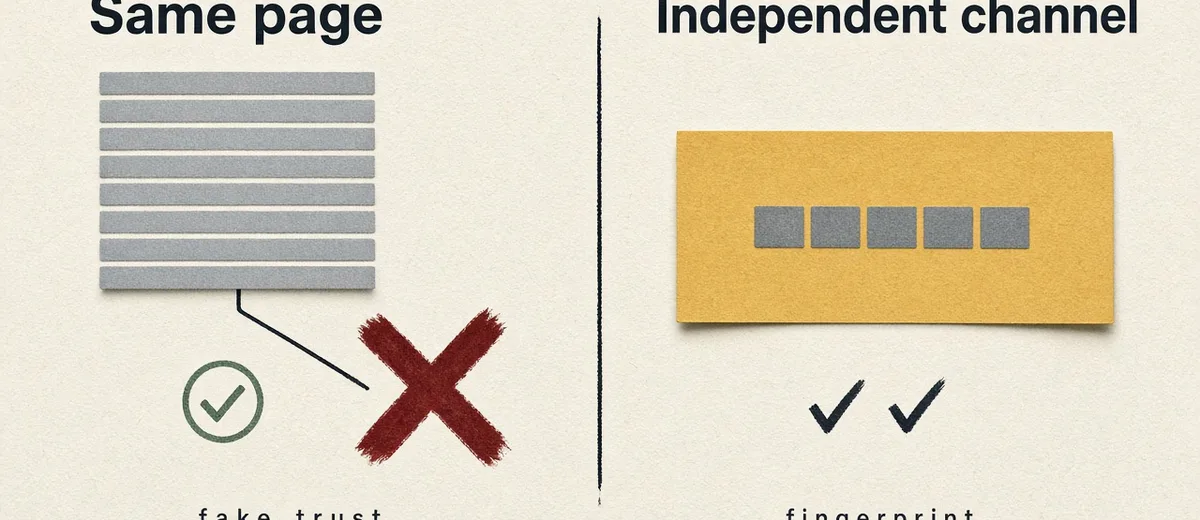
The defence is not more elaborate signature checking on the suspicious page. It is never using that page as the source of the public key. You obtain the fingerprint first—through a forum profile you reached earlier via a bookmark, a saved key from a prior visit, a software vendor’s ordinary website, or another channel that the clone operator does not control—and only then do you import a key and verify a message. The fake seizure banners section on darknet news makes a parallel point about images: a convincing graphic is cheap; the test is whether an independent record agrees. Here the independent record is the fingerprint, not the armour blocks on the page you are unsure about.
Fingerprints, key IDs, and names
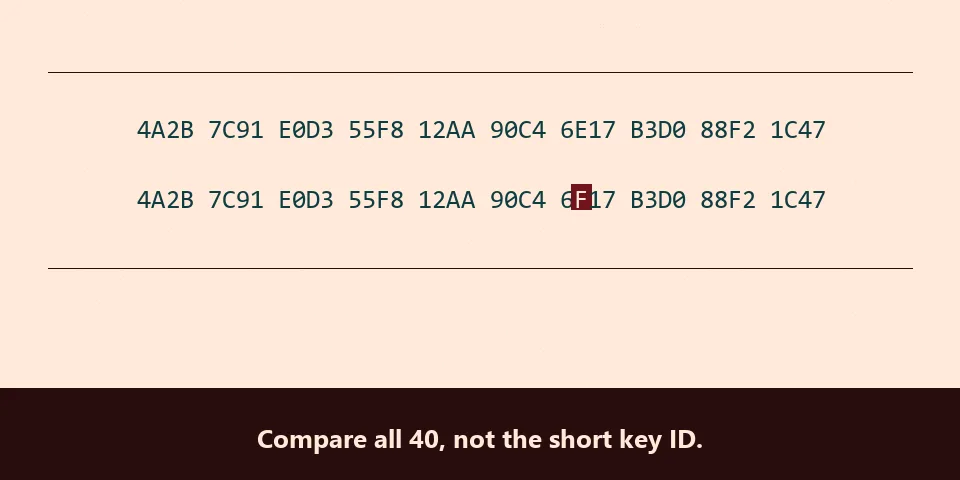
Every OpenPGP public key has a fingerprint, typically shown as 40 hexadecimal characters for a v4 key. The pgp.net verification guide recommends comparing the full fingerprint, not the short “key ID” that GnuPG prints beside “using RSA key” in its status lines. Short IDs are short enough that another key can share the same trailing digits by design or accident, which is why marketplace clone tutorials that stop at eight characters are unsafe.
User names inside a key are labels, not evidence. The string beside “Good signature from” is whatever the key’s creator typed. Two different keys can both display the same operator name; only the fingerprint distinguishes them.
Practical rule: before you trust a signed mirror list or canary message, run gpg --show-keys on the imported public key (or read the fingerprint in your graphical tool) and compare all 40 characters to the fingerprint published on the independent channel. If any character differs, stop. Do not verify messages with that key and do not treat addresses in an accompanying HTML table as authentic.
Where an independent key should come from
“Independent” means the channel is not controlled by the same site that is asking you to log in or deposit funds today. Legitimate organisations model this on the clearnet. The Tor Project publishes signing keys on its website and documents how to verify downloads; users are expected to check signatures against keys obtained there, not against keys emailed by strangers. The Tor Project’s onion service documentation explains address authentication for hidden services; PGP-signed announcements are the human-scale equivalent when operators rotate mirrors after denial-of-service attacks.
In the wider Tor ecosystem, long-running forums and markets publish the same fingerprint in multiple places so regular visitors can cross-check. A buyer who bookmarked a genuine login weeks ago can compare a new announcement against the key already on disk. A buyer who arrives from a search engine, as described on clearnet clone pages, has no such anchor. Clone sites are built for that second visitor.
You do not need many sources, but you need at least one that predates the page you distrust. A fingerprint repeated on two channels that do not share hosting is stronger than one channel alone. A fingerprint shown only on the page demanding your password is not an independent source.
Verify a clearsigned message with GnuPG
Mirror announcements are often clearsigned: the human-readable text sits in the same file as the signature armour. Copy the entire block from -----BEGIN PGP SIGNED MESSAGE----- through -----END PGP SIGNATURE----- without trimming lines or “fixing” line endings; a single extra space breaks verification.
Save it to a file and import the operator’s public key from your trusted channel into your normal GnuPG keyring, or into a throwaway keyring if you prefer isolation. Then verify:
gpg --verify signed-mirrors.txtIf GnuPG prints Good signature and the fingerprint shown matches the one you already trusted, read the addresses or URLs inside the signed text only. Ignore onions or links in the surrounding web page, in comment sections, or in a second unsigned block below the armour. Operators sometimes post the signed list in one place and unsigned commentary elsewhere; clones mix signed-looking armour with unsigned tables.
The December 2025 GnuPG blog post “Cleartext Signatures Considered Harmful” warns that terminals can display misleading text around a signature because control characters and escape sequences are not part of the signed payload. For high-stakes decisions, extract the signed plaintext explicitly:
gpg --verify -o signed-plain.txt signed-mirrors.txtRead signed-plain.txt, not the colourful page in your browser.
Verify a detached signature
Some teams publish a plain-text file plus a separate .asc signature. The GnuPG manual states that for detached signatures you name the signature file first and the data file second:
gpg --verify mirrors.txt.asc mirrors.txtDo not rely on GnuPG guessing the data filename from the signature name alone; the manual discourages one-argument detached verification for that reason. The same fingerprint rule applies before you interpret a good result.
For automated checks, the gpgv tool verifies against an explicit keyring you supply, which is appropriate when you ship only the operator’s public key and refuse all others. Recent GnuPG releases also support --assert-signer FINGERPRINT so scripts succeed only when a named key signed the file.
How to read verification output
A successful verification usually looks like this pattern (values will differ):
gpg: Signature made …
gpg:                using EDDSA key …
gpg: Good signature from "…" [unknown]
The word [unknown] or warnings that the key is not certified are normal when you have not personally signed the key in your web of trust. They do not mean the signature failed. They remind you that the user name is unauthenticated metadata.
Outcomes that should stop you:
- BAD signature — the message was altered, truncated, or copied with a typo. Do not use any addresses from it; obtain a fresh copy from a channel you trust.
- Can't check signature: No public key — import the correct key from your independent source, not from the suspicious page.
- Good signature with a fingerprint that does not match your independent record — treat as a forged key pair, even if the user name looks right.
Do not trust HTML widgets that mimic this output. Only a local OpenPGP program operating on the armour you pasted or saved performs the check.
How clone sites abuse signed messages
Clearnet clones described on darknet markets imitate account screens and captcha updates. When a service rotates mirrors after an attack, as noted on darknet news, newcomers search for a fresh link and meet those clones first. A clone can paste a entire signed block copied from a real announcement days earlier, pair it with a newer unsigned table of phishing addresses, or mint a new key with a similar name.
None of those tricks defeats fingerprint pinning. They defeat users who verify before pinning, or who pin only the eight-character key ID shown in a screenshot. They also defeat readers who assume that because one block on the page verifies, every link on the page is covered. Only bytes inside the signed literal data are protected.
Signed messages are still worth using when the workflow is right. They let operators rotate infrastructure under fire without asking users to trust a search result. They give journalists and researchers a reproducible artifact to compare across time, as with voluntary retirements discussed on darknet market history. The tool is sound; the failure mode is treating verification as a substitute for source authentication.
A practical workflow when you lack a saved key
If you have never visited the genuine service, you cannot safely verify today’s mirror list with cryptography alone. No procedure on this page invents a trust anchor from thin air. What you can do is refuse to act on unsigned addresses, refuse to import keys from the same page that wants your credentials, and wait until you obtain a fingerprint through a path that does not depend on that page—peer referral with an out-of-band fingerprint check, archived copies from before the attack, or the operator’s presence on a forum you already reached through a bookmark.
That is frustrating by design. Clone operators bet on impatience after downtime. The alternative is depositing into an address that appeared beside a green “PGP verified” badge that was never checked against an independent fingerprint. Checking onion addresses and checking signed mirror messages solve different layers of the same problem: the first compares host identifiers; the second compares operator intent about which hosts are live. Both require a first visit that does not begin on a search engine landing page.
How we know what we say about PGP-signed messages
Commands, signature types, and the detached-file argument order come from the current GnuPG operational manual and gpgv documentation. Cleartext verification cautions come from GnuPG’s December 2025 blog post. Fingerprint and trust-limit explanations align with long-standing Security Stack Exchange answers and the community guide at pgp.net. We have not run verification against any live operator announcement for this article. Labelling rules and assessment language follow our editorial standards.
PGP-signed messages: common questions
How do I verify a PGP signed message on the command line?
Import the operator’s public key from a channel you already trust, save the complete armour block to a file, and run gpg --verify filename for a clearsigned message, or gpg --verify file.sig file for a detached signature. Confirm the signing key’s fingerprint matches your independent record before you trust the text inside.
What is the difference between clearsigned and detached signatures?
Clearsigned messages embed readable text and signature armour in one file; detached signatures keep a separate .asc (or similar) alongside the plain data. GnuPG’s manual documents both under --clearsign and --detach-sign.
What does “Good signature” mean if GnuPG says the key is untrusted?
The cryptography succeeded: the named key signed the data. The warning means you have not established personal trust in that key’s ownership yet. Compare the fingerprint to an independent source; the warning is expected until that step passes.
Why check the fingerprint instead of the name on the key?
Names are chosen by whoever generated the key. Only the full fingerprint identifies a specific public key. Short key IDs are too small to pin identity reliably.
Can a phishing site show a valid PGP signature?
Yes, if it generated its own key pair and signed its own message. Verification would still report “Good signature.” That is why importing the key from the same page is unsafe.
How do operators publish mirror lists with OpenPGP?
They clearsign or detach-sign a short text file listing current mirrors, publish the signing key’s fingerprint in multiple places, and expect users to verify new lists against that fingerprint. Exact publishing channels vary; this page does not endorse any operator.
Does verifying a signed message replace comparing onion addresses character by character?
No. Signatures authenticate operator intent about which addresses are official; users still must copy addresses exactly and compare them to the signed list, as explained on useful onion links.